AI-Based Statement Analyser

Turn bank statements into credit-ready insights

AI-powered bank statement extraction, validation and financial analysis built for faster, more consistent lending decisions. Digital PDFs, scanned statements and images — transformed into structured financial intelligence.

Digital & scanned PDFs Statement images Multi-file cases
98.5% OCR accuracy 9.6K rows analysed
bankstatementiq · Overall Analytics
BankStatementIQ analytics dashboard showing totals, financial intelligence, fraud and anomaly detection, and processing pipeline metrics
From statement to decision-ready data

Six stages. One automated pipeline.

Reviewing bank statements manually takes time, creates inconsistencies and makes it difficult for credit teams to identify important financial patterns across hundreds of transactions. BankStatementIQ automates the process.

01

Upload

Upload one or multiple bank statements in supported digital or scanned formats.

02

Extract

AI and OCR technologies identify statement information and convert transactions into structured data.

03

Validate

The system validates transaction data, balances, dates and statement consistency before analysis.

04

Analyse

Financial behaviour, income patterns, obligations, anomalies and key credit indicators are calculated.

05

Review

Credit teams receive a structured dashboard and transaction-level output for decision-making.

06

Notify

Files queue and process unattended. Completion notifications go out by email or WhatsApp with the report attached.

Statements · live processing
Statement folder with files processing live, showing progress cards and an upload status toast
Files process automatically the moment they're uploaded — no action needed.
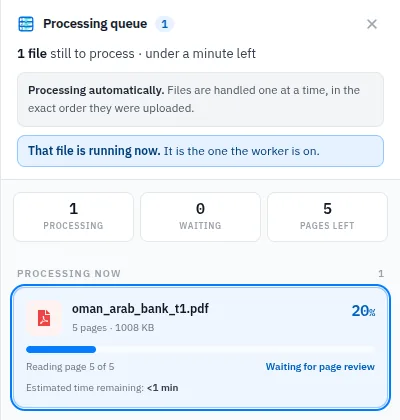
Processing queue drawer showing a file being read page by page with estimated time remaining
Follow every file, page by page.
Built for real-world bank statements

Every bank formats differently. That's fine.

Bank statements are rarely standardised — different banks use different layouts, transaction descriptions and document structures. BankStatementIQ recognises banks and statement layouts automatically, including scanned and low-quality documents.

10 banks recognised automatically 31 statement layouts Digital + scanned PDFs Arabic & English statements
Supported Banks
Supported banks grid including Ahli Bank, Bank Dhofar, Bank of Baroda, Bank Sohar, Bank Muscat, NBO and Oman Arab Bank with their recognised statement layouts
Bank & layout recognition happens automatically at upload — new templates are learned over time.
Extraction, side by side

From original statement to structured data

The original document stays on screen next to its extracted output — transaction dates, value dates, descriptions, debits, credits and running balances, preserved exactly as the bank recorded them and exported straight to Excel.

bank_muscut_t5.pdf · Excel Preview
Split view with the original Bank Muscat statement on the left and the extracted multi-sheet Excel workbook on the right
Original bank statement Extracted workbook — 7 sheets, downloadable

Point at a transaction to see what comes out

Every extracted figure traces back to the line it came from. Illustrative sample.

statement · page 1
  • 10/06/2025POS PURCHASE 179334 — RETAIL1.000
  • 09/06/2025SALARY CREDIT — JUNE 2025900.000
  • 06/06/2025INWARD TRANSFER — CORPORATE2500.000
  • 04/06/2025ATM CASH WITHDRAWAL200.000
  • 02/06/2025UTILITY PAYMENT — ELECTRICITY78.600
  • 01/06/2025CHEQUE CLEARING 004521540.000
extracted · OMR
DateDescriptionDebitCreditBalance
2025-06-10POS Purchase — Retail1.00019546.983
2025-06-09Salary Credit900.00019547.983
2025-06-06Inward Transfer2500.00018647.983
2025-06-04ATM Cash Withdrawal200.00016147.983
2025-06-02Utility Payment78.60016347.983
2025-06-01Cheque Clearing540.00016426.583
Automated financial analysis

Go beyond OCR — understand the account

Income & salary analysis

Automatically identify recurring salary credits and income patterns.

  • Salary transaction identification & monthly detection
  • Average salary calculation and missing salary months
  • Salary consistency and changes in salary values
  • Other recurring income

Monthly cash flow analysis

Understand how money moves through the account.

  • Monthly credits & debits, with monthly averages
  • Net monthly cash flow and transaction volumes
  • Closing balance trends
  • Account utilisation
Shareable PDF summary report with account details, opening and closing balances, highest and lowest balances
Summary Report — a shareable PDF for credit, risk and operations review.
Cashflow forecast projecting balance, inflow, outflow and detected account behaviour over the next three months
Cashflow Forecast — the account's own rhythm, projected forward.
Behavioural detection

Detect financial behaviour that matters

BankStatementIQ automatically looks for patterns that would otherwise require manual transaction-by-transaction review.

Negative balance detection

Identify periods where the account balance falls below zero.

Unusual transaction spikes

Highlight unusually large credits or debits compared with normal account behaviour.

Repeated transactions

Detect recurring transactions including salaries, rent, instalments and regular commitments.

Returned / bounced transactions

Surface transactions that may indicate returned payments or bounced cheques.

Foreign transactions

Identify transactions involving foreign markets or currencies where relevant.

Large cash transactions

Highlight significant cash deposits or withdrawals based on configurable business rules.

Transfer pair detection

Identify related incoming and outgoing transfers to prevent artificial inflation of account turnover.

Duplicate description patterns

Spot repeated narrations that may indicate structured or split transactions.

Date & balance mismatches

Catch inconsistencies between transaction dates, running balances and statement totals.

Explainable by design

Every result carries its evidence

Automation should make analysis faster — not hide the underlying data. Policy checks are stated plainly: when a statement is shorter than your rules require, the system says so — and still reports complete figures for the months it found.

  • Month-by-month credit totals, readable at a glance
  • Policy flags explained in plain language, never silent rejections
  • The same structured output delivered to your systems via API
  • Full transaction detail behind every metric and flag
API output view flagging that the statement is below the required length while still reporting month-by-month credit totals
API Output — the exact summary your credit systems receive.
Configurable to your institution

Analyse according to your credit policy

Configurable rules & parameters

The platform complements your existing credit policies rather than forcing your organisation into a fixed analysis model.

  • Minimum statement period CONFIG
  • Minimum salary requirement CONFIG
  • Salary averaging period CONFIG
  • SME average monthly turnover CONFIG
  • Large cash transaction thresholds CONFIG
  • Transfer-in / transfer-out exclusions CONFIG
  • Negative-balance rules CONFIG
  • Transaction anomaly thresholds CONFIG

Build your own analysis views

Create reusable analysis and query configurations for different lending products. Define criteria, save templates and apply the appropriate view to statement data.

Personal financeSalary stability, recurring commitments and account behaviour.
Vehicle financeIncome, repayment capacity and existing obligations.
SME financeTurnover, cash flow, business activity and transaction patterns.
Corporate analysisHigher-volume transaction and account behaviour analysis.
High-volume by design

Built for scale. Built for integration.

Process multiple statements through an automated AI pipeline instead of analysing them individually — organised into case folders, monitored in real time, and mergeable into consolidated multi-statement reports.

Statement Folders & Files
Statement folders organised by case with file counts and sizes
Organise statements into case folders — merge them into one consolidated report.
Upload Monitoring
Upload monitoring dashboard showing uploaded, completed, in-progress and error counts with daily performance
Operational visibility across every upload, every day.
Customer / Credit Officer BankStatementIQ API AI Processing Engine Analysis LOS / Credit System
Loan Origination Systems Credit Decisioning Platforms Core Banking Systems Customer Portals Mobile Banking Applications Document Management Workflow / BPM Platforms Internal Credit Applications
Security built for financial information

Sensitive data, deployed your way

Bank statements contain highly sensitive financial information. The platform can be deployed within the institution's controlled infrastructure according to security and compliance requirements — down to which tabs each role can open.

  • Role-based access control
  • Secure authentication & Microsoft AD
  • Controlled document access
  • Encrypted communication
  • Audit trails & activity tracking
  • Secure APIs
  • Configurable document retention
  • On-premise deployment options
Tab Access Control
Tab access control matrix assigning per-role access to each file detail tab across IT, Risk, General and Staff roles
Per-role, per-tab access — Risk sees what Risk needs.
Why BankStatementIQ?

Less data preparation. Better credit decisions.

Faster analysis

Reduce the time spent manually reading and calculating information from lengthy statements.

Consistent evaluation

Apply the same validation and analysis logic across every statement.

Deeper financial insights

Identify patterns that are difficult to recognise through manual review alone.

Reduced manual errors

Automate repetitive extraction and calculation activities.

Better credit productivity

Analysts spend more time evaluating applicants and less time preparing data.

Explainable results

Maintain transaction-level visibility behind every metric and flag the system produces.

Product presentation

The whole story, in one deck

Thirteen slides covering extraction, validation, financial analysis and deployment — the document to forward to a credit committee or an IT reviewer.

Presentation cover slide: Turn Bank Statements Into Credit-Ready Insights

BankStatementIQ — AI Statement Intelligence

  • 13 slides
  • PDF · 1.6 MB

Opens in your browser's PDF viewer. 1.6 MB — the file is only fetched when you ask for it.

One statement · Thousands of transactions · One clear view

See your statements the way
your credit policy does.

Transform unstructured bank statements into structured, validated and actionable financial intelligence.


Muscat Tech Solutions